
ChatGPT-4o
Nature
Published Nov 5, 2026
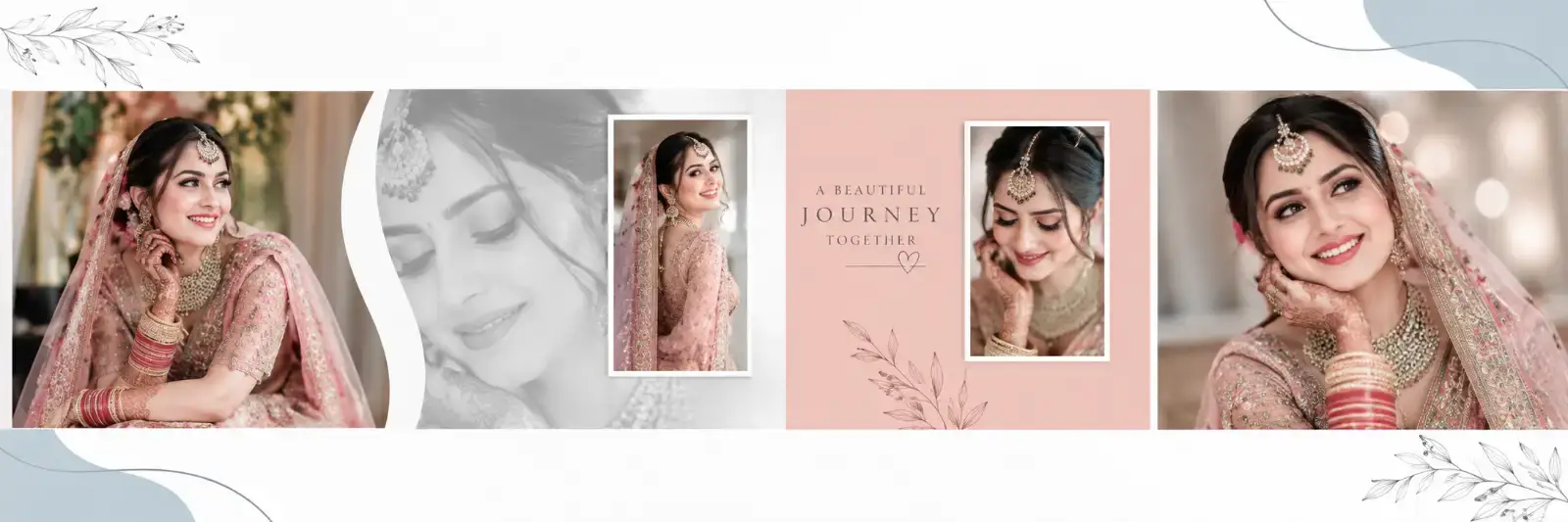
12 x 36 Bridal Editorial Wedding Photo Album Template
## Reusable Album Template Prompt — Exact 4-Photo Bridal Editorial Layout — 12″ H × 36″ W — Exact 3:1 Landscape
Ai Prompt Labs
@admin • Prompt Engineer
Prompt Instruction Payload
## Reusable Album Template Prompt — Exact 4-Photo Bridal Editorial Layout — 12″ H × 36″ W — Exact 3:1 Landscape
Create a **premium photorealistic bridal/wedding album spread** that recreates the supplied reference image **as closely and precisely as possible**.
This is an **EXACT-LAYOUT reusable album template**.
The **reference image is the absolute source of truth for layout and design**.
The **user-uploaded photos are the absolute source of truth for the people and photo content**.
Do not redesign, reinterpret, rebalance, simplify, modernize, or creatively alter the reference layout.
---
# FIXED CANVAS
The final canvas is strictly locked to:
**36 inches wide × 12 inches high**
**Exact 3:1 landscape aspect ratio**
Requirements:
- keep the spread strictly horizontal
- width must remain exactly three times the height
- do not convert to portrait
- do not crop the final page into another ratio
- do not stretch or compress the overall canvas
- preserve the same wide panoramic structure as the reference
---
# MANDATORY ASK-FIRST WORKFLOW
Before generating the album, check whether all mandatory inputs have been provided.
This template requires:
- **4 uploaded photos**
- **1 exact caption/title/sentence**, unless the user wants no text
If both are missing, respond only:
**“Please upload 4 photos for this template and tell me the exact caption/title/sentence you want displayed. If you don’t want any text, say ‘no text’.”**
If the user uploads the 4 photos but has not provided the text preference, respond only:
**“Please tell me the exact caption/title/sentence you want displayed. If you don’t want any text, say ‘no text’.”**
If fewer than 4 photos are uploaded, ask only for the remaining required photos and any missing text preference.
Do **not** generate the image until all mandatory requirements are satisfied.
Once all required photos and text preference are available, **automatically generate the album image**. Do not return the prompt again and do not ask additional questions.
---
# ABSOLUTE REFERENCE LAYOUT LOCK
Reproduce the reference image’s layout **as literally as possible**.
Treat all of the following as fixed:
- exact photo-slot locations
- exact relative photo sizes
- exact photo-frame proportions
- exact horizontal placement
- exact vertical alignment
- exact amount of white space
- exact curved-divider position
- exact faded grayscale portrait area
- exact narrow framed photo position
- exact coral/blush rectangular panel
- exact small framed portrait inside the coral panel
- exact large right-side portrait
- exact botanical decoration placement
- exact pale blue-gray abstract corner shapes
- exact margins
- exact spacing
- exact overlaps
- exact visual hierarchy
- exact overall balance
Do **not**:
- move photo slots
- enlarge one image unnecessarily
- shrink another image
- change frame shapes
- change the curve position
- change the coral panel size
- replace the grayscale portrait treatment
- rearrange decorative elements
- convert the composition into another collage style
- add extra frames or photos
- remove structural elements visible in the reference
The goal is:
**same layout, same geometry, same structure — only the uploaded photos and optional user text change.**
---
# FIXED PHOTO COUNT
This template uses exactly **4 uploaded photos**.
Use each uploaded photo once only.
Do not:
- duplicate a photo
- invent extra photos
- reuse one photo in multiple main slots
- replace an uploaded photo with generated content
---
# FIXED PHOTO-TO-SLOT MAPPING
Use uploaded photos strictly in this order:
### Photo 1
Place in the **large far-left vertical image slot**.
### Photo 2
Place in the **narrow center-left vertical framed image slot**.
Also use Photo 2, or the most compositionally suitable uploaded portrait if necessary, only for the **soft faded grayscale background portrait treatment** directly behind/adjacent to this area.
The faded portrait is a design treatment, not an additional photo slot.
### Photo 3
Place in the **small vertical framed portrait inside the coral/blush panel**.
### Photo 4
Place in the **large far-right vertical portrait slot**.
Do not change this mapping.
---
# ABSOLUTE PHOTO PROPORTION LOCK
This is a critical rule.
The user-uploaded photos must **never be stretched or distorted** to match the template.
For every uploaded image:
- preserve its original natural proportions
- preserve correct face proportions
- preserve correct body proportions
- preserve correct clothing proportions
- preserve correct object geometry
- preserve natural perspective
Never:
- stretch vertically
- stretch horizontally
- squeeze
- squash
- widen
- narrow
- warp
- skew
- distort
- reshape the person to fit the frame
If an uploaded image has a different aspect ratio from the fixed template slot:
**scale the photo proportionally and crop excess image area.**
Use:
- proportional scaling
- subject-aware cropping
- repositioning within the fixed frame
- safe face-aware framing
The **frame remains fixed**.
The **photo adapts through cropping, not stretching**.
The frame may crop parts of the original image if necessary, but the image itself must remain geometrically correct.
---
# SUBJECT-AWARE CROPPING RULE
When fitting uploaded photos into the fixed reference slots:
Prioritize keeping visible:
- faces
- heads
- important body areas
- hands where possible
- clothing details
- important jewelry
- central subjects
Avoid:
- cutting through faces
- awkward neck crops
- removing important facial features
- unnecessary limb cuts
- extreme zooming
However, never alter the fixed slot dimensions to save more of the photo.
The **layout stays fixed**.
Only the internal photo positioning may change.
---
# LEFT SECTION — EXACT STRUCTURE
Recreate the left side exactly like the reference.
## Large left photo
Place **Photo 1** in the far-left vertical rectangular image area.
Keep:
- same approximate width
- same approximate height
- same vertical placement
- same edge alignment
- same scale relationship to the rest of the spread
Do not enlarge it beyond the reference proportion.
---
# CURVED DIVIDER
Immediately to the right of the large left photo, recreate the large **white sweeping curved divider** seen in the reference.
The divider must:
- retain the same direction
- retain the same approximate curvature
- retain the same visual thickness
- separate the left image from the faded portrait region
- not be replaced by a straight line
- not be removed
---
# FADED GRAYSCALE PORTRAIT AREA
Behind the narrow center-left framed photo, recreate the same large faded grayscale portrait treatment.
This should look like:
- a softly enlarged portrait
- monochrome / grayscale
- low contrast
- pale
- elegant
- semi-transparent
- blended into the white/light background
Do not make it dark or dominant.
Do not turn it into a separate hard-edged photo frame.
It should remain a **soft background portrait layer**, like the reference.
---
# CENTER-LEFT NARROW FRAME
Place **Photo 2** into the tall narrow vertical frame.
Match the reference:
- narrow upright rectangle
- white/light border
- vertically centered
- positioned over the faded background portrait
- same approximate frame width
- same approximate frame height
- same visual spacing around the frame
Do not convert it into:
- a square
- circle
- oval
- arch
- large rectangle
---
# CORAL / BLUSH PANEL
Recreate the same coral/blush panel in the center-right portion of the image strip.
Keep:
- same approximate width
- same vertical position
- same proportion
- same muted warm pink/coral appearance
Do not replace it with a random color.
The panel should remain soft and elegant rather than bright or neon.
---
# SMALL FRAMED PHOTO INSIDE CORAL PANEL
Place **Photo 3** inside the small vertical framed portrait located within the coral panel.
Match the reference:
- upright rectangular frame
- pale/white border
- same approximate placement
- same approximate size
- balanced negative space around it
Do not center it differently if the reference is slightly offset.
Follow the reference placement.
---
# CORAL PANEL BOTANICAL DETAIL
At the lower portion of the coral panel, recreate the same subtle floral/botanical decorative silhouette.
Keep it:
- understated
- tonal
- elegant
- small
- secondary to the photo
Do not replace it with large flowers or heavy ornamentation.
---
# FAR-RIGHT LARGE PHOTO
Place **Photo 4** into the large far-right portrait area.
Match the reference:
- same approximate width
- same approximate height
- same right-edge alignment
- same dominance
- same close-up editorial feeling
Do not enlarge this image beyond the reference structure.
Do not allow it to consume the coral panel.
---
# TOP WHITE SPACE
Preserve the large open white/ivory area above the main image strip.
The top must remain mostly empty.
Do not fill it with:
- photos
- patterns
- extra frames
- large text
- heavy decoration
Recreate the subtle decorative elements only.
---
# TOP-LEFT BOTANICAL LINE ART
Recreate the same faint botanical line drawing near the top-left corner.
Keep it:
- light
- subtle
- thin-line
- low contrast
- partially cropped at the edge
Do not make it bold.
---
# TOP-RIGHT ABSTRACT SHAPE
Recreate the pale blue-gray organic corner shape at the top-right.
Keep approximately the same:
- size
- position
- softness
- shape weight
Include the subtle fine curving line detail seen around this area.
---
# BOTTOM WHITE SPACE
Preserve the large open white/ivory area below the central collage.
Do not enlarge the photos downward to fill this area.
This whitespace is part of the exact design.
---
# BOTTOM-LEFT ABSTRACT SHAPE
Recreate the pale blue-gray organic shape entering from the lower-left.
Maintain:
- same visual scale
- same edge-cropped appearance
- same muted tone
Include the thin sweeping line passing through/near this area as in the refe
Insert discreet watermark in the lower right corner of the image, vertical text (rotated 90°), written "aipromptlabs.online", Calibri Light font, white color with low opacity (semi-transparent), medium size. Extreme sharpness on the face, fabric texture and typography of the letters. Shot on Canon EOS R5, 50mm f/2.8, studio light.
Gemini 2.0 Flash
Gemini 2.0 Flash
ChatGPT-4o
ChatGPT-4o
ChatGPT-4o

Creator Discussions & Community Comments 0
Join the AI Prompt Labs community to comment and share variations.