
ChatGPT-4o
Fashion
Published Nov 5, 2026
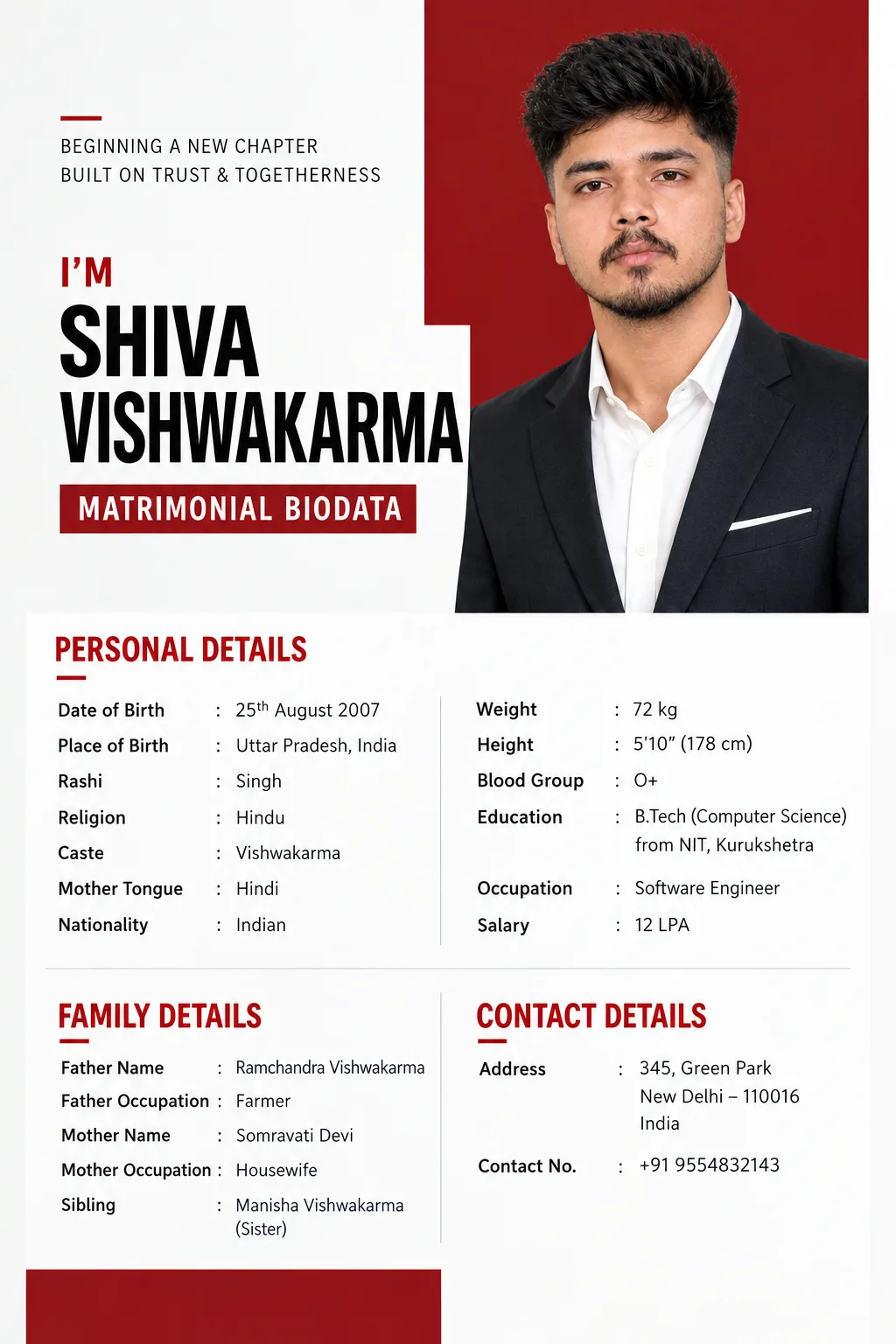
Bold Red Modern Matrimonial Biodata for Men | AI Image
## FINAL PREMIUM MODERN MATRIMONIAL BIODATA PROMPT — BOLD RED EDITORIAL RESUME STYLE

Ai Prompt Labs
@admin • Prompt Engineer
Prompt Instruction Payload
## FINAL PREMIUM MODERN MATRIMONIAL BIODATA PROMPT — BOLD RED EDITORIAL RESUME STYLE
Create a **premium-quality, modern matrimonial biodata design** inspired by the uploaded reference image.
Use the uploaded reference image **only as a visual guide** for its:
- vertical A4 portrait composition
- clean white and light-grey background
- bold red accent blocks
- large portrait positioned prominently in the upper-right area
- strong geometric rectangular composition
- oversized bold name typography
- modern sans-serif font pairing
- asymmetric editorial layout
- clean two-column information arrangement
- red uppercase section headings
- precise grid-based alignment
- generous whitespace
- minimal contemporary presentation
- strong contrast between black typography, white space, and red accents
- premium magazine/editorial design language
The reference image is strictly a **layout, typography, portrait-placement, spacing, alignment, color-balance, and composition reference**.
**Do not copy** the reference person's photograph, facial identity, name **“Carl Jones,”** profession, phone number, email, website, social-media information, Experience, Education entries, company names, dates, lorem ipsum text, or any other readable content.
The final result must be a **modern matrimonial biodata**, not an employment résumé or CV. Retain the stylish contemporary appearance of the reference while replacing all résumé-related information with matrimonial biodata details.
Do **not** include Experience, Career, Skills, Job Position, Company, social-media handles, portfolio website, professional summary, or résumé-specific sections.
Do not use unnecessary icons, QR codes, skill bars, charts, decorative pictograms, or visual clutter.
---
### MANDATORY USER INPUT WORKFLOW
**Before creating the biodata, ask the user in ONE message:**
**“Please upload your portrait photo and provide the following biodata details:”**
**PERSONAL DETAILS**
- Name
- Date of Birth
- Place of Birth
- Rashi
- Religion
- Caste
- Mother Tongue
- Nationality
- Weight
- Height
- Blood Group
- Education
- Occupation
- Salary
**FAMILY DETAILS**
- Father Name
- Father Occupation
- Mother Name
- Mother Occupation
- Sibling
**CONTACT DETAILS**
- Address
- Contact No.
Do **not invent, guess, or automatically fill any missing information.**
After the user submits the information, check every requested field.
If one or more details are missing, clearly mention those missing fields and ask:
**“Would you like me to remove any of these fields from the biodata, or would you like to provide the missing details?”**
Do not create the final biodata until the user confirms whether the missing fields should be supplied or removed.
Use **only the user's latest confirmed information** in the final design.
---
## DESIGN STRUCTURE
Create the finished biodata in a **vertical A4 portrait format**.
### Upper Composition
Use a clean white/light-grey canvas with a strong **red accent panel** inspired by the reference.
Place the user's portrait prominently in the **upper-right portion** within a clean geometric rectangular area with a deep red background.
The portrait should feel naturally integrated into the overall graphic design rather than appearing like a pasted passport photograph.
Use the uploaded portrait only as the person's identity reference. Preserve natural facial identity, skin tone, hairstyle, age appearance, and realistic body proportions.
On the upper-left side, use minimal decorative typography or subtle introductory treatment while maintaining generous whitespace.
---
### NAME AREA
Create a dominant typographic section beneath or beside the portrait.
Display the user's **Name in very large, bold black sans-serif typography**, similar to the strong visual hierarchy of the reference.
Example hierarchy:
**Hi, I'm**
**[USER NAME]**
If a more matrimonial-focused presentation is preferred, the introductory wording may be omitted and the person's name can simply become the dominant headline.
Do not invent a professional title beneath the name.
Instead, use a subtle label such as:
**MATRIMONIAL BIODATA**
or simply leave the area minimal.
Use dark red for small accents and secondary headings.
---
### PERSONAL DETAILS
Replace the reference résumé information with a structured **PERSONAL DETAILS** section.
Present the confirmed fields neatly in two balanced columns where space allows.
Use small uppercase dark-red section headings, black labels, and clean dark-grey information text.
Keep label/value alignment consistent.
---
### FAMILY DETAILS
Create a separate **FAMILY DETAILS** section using the same modern editorial styling.
Include only the confirmed:
Father Name
Father Occupation
Mother Name
Mother Occupation
Sibling
Maintain the strong grid structure and generous spacing visible in the reference.
---
### CONTACT DETAILS
Create a clean **CONTACT DETAILS** section containing only:
Address
Contact No.
Do not repeat the address or contact number elsewhere in the design.
---
## COLOR PALETTE
Use a restrained modern palette inspired by the reference:
- clean white
- very light warm grey
- deep contemporary red
- black
- charcoal grey
The red should function as a **strong editorial accent**, not overwhelm the page.
---
## TYPOGRAPHY
Use:
- bold geometric sans-serif typography for the name
- clean modern sans-serif typography for all information
- uppercase red section headings
- medium-weight labels
- regular-weight values
Maintain strong visual hierarchy and excellent readability.
Avoid ornate traditional fonts.
---
## FINAL VISUAL DIRECTION
The finished biodata should feel like a **premium contemporary editorial profile redesigned specifically for matrimonial use**.
It should be:
**simple, neat, modern, elegant, sophisticated, youthful, spacious, and professionally composed.**
Preserve the reference image's strongest characteristics—**bold red geometry, oversized typography, prominent portrait placement, clean grid structure, asymmetric composition, and generous whitespace**—while making all content clearly matrimonial-focused.
The finished image must look like an **original biodata design inspired by the visual language of the reference**, not a duplicated résumé template.
Insert discreet watermark in the lower right corner of the image, vertical text (rotated 90°), written "aipromptlabs.online", Calibri Light font, white color with low opacity (semi-transparent), medium size. Extreme sharpness on the face, fabric texture and typography of the letters. Shot on Canon EOS R5, 50mm f/2.8, studio light.
ChatGPT-4o

ChatGPT-4o
ChatGPT-4o
Gemini 2.0 Flash

ChatGPT-4o

Creator Discussions & Community Comments 0
Join the AI Prompt Labs community to comment and share variations.