
ChatGPT-4o
Digital Art
Published Oct 31, 2026
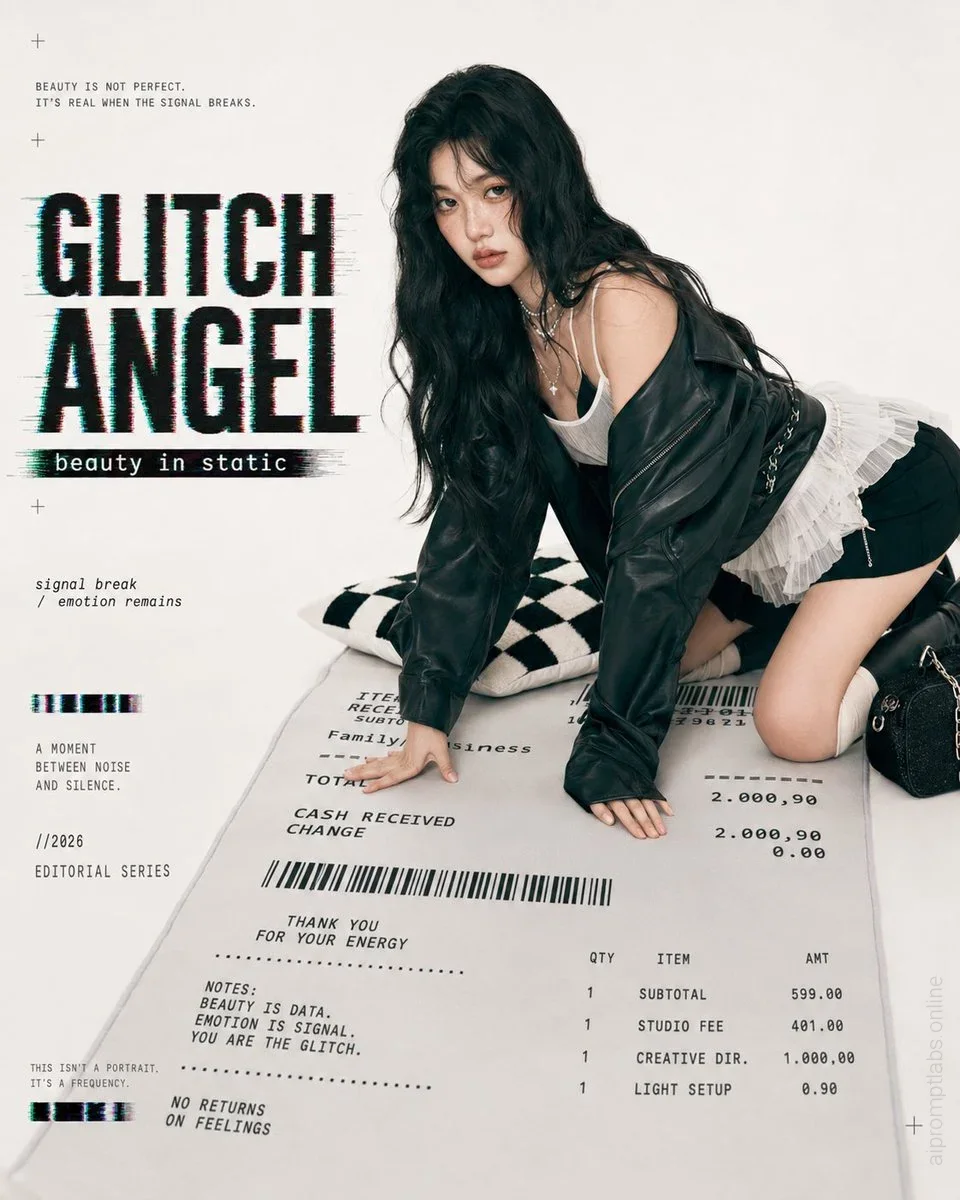
Glitch Angel Editorial Studio Shoot
Generates a photorealistic glitch-fashion magazine cover featuring an anonymized model posed on a giant receipt prop. - YouMind
Ai Prompt Labs
@admin • Prompt Engineer
Prompt Instruction Payload
Goal: Create a realistic fashion magazine studio shot with an AI toy-catalog feeling: a life-size small figurine-like female model posed on a giant receipt prop, with glitch typography and editorial graphic design.
Canvas: Square 1:1 image, clean off-white studio background, high-key soft lighting, subtle shadows, premium magazine cover composition.
Subject: A young woman with long wavy black hair, face deliberately obscured by a soft rectangular blur for anonymity. She is kneeling and leaning forward on both hands, angled three-quarters toward camera, wearing an oversized black leather jacket slipped off one shoulder, a white camisole, layered silver necklaces, black shorts, a white ruffled pleated skirt detail, and black knee-high boots. Add a small black textured handbag with chain hardware near her right side. Her pose should feel like a glossy studio fashion shoot but slightly surreal, as if she is a collectible human figurine.
Main props and counted elements: Include exactly 3 main physical props: 1 oversized receipt-shaped floor mat under the model, 1 black-and-white checkerboard pillow behind her left arm, and 1 small black handbag near her right knee. The giant receipt mat must contain barcode graphics, itemized receipt typography, totals, and small editorial notes.
Layout: Place the model on the right two-thirds of the frame, crouched over the receipt mat. Reserve the left third for bold editorial text and glitch graphics. Keep the background minimal and creamy white. Add small registration-cross marks in the corners and along the left side for a print-layout feel.
Text content: Large headline on the left: GLITCH ANGEL, in huge black condensed uppercase letters with cyan/red RGB offset, horizontal glitch smears, and distressed pixel edges. Under it, a black strip subtitle: beauty in static. Top-left small copy: "BEAUTY IS NOT PERFECT. IT'S REAL WHEN THE SIGNAL BREAKS." Mid-left italic copy: "signal break / emotion remains". Lower-left stacked copy: "A MOMENT BETWEEN NOISE AND SILENCE." then "//2026" then "EDITORIAL SERIES". Bottom-left tiny copy: "THIS ISN'T A PORTRAIT. IT'S A FREQUENCY." Add two short horizontal glitch bars on the left, exactly 2 bars.
Receipt text details: On the oversized receipt mat, include readable typewriter-like receipt lines such as "ITEM RECEIPT", "Family business", "TOTAL", "CASH RECEIVED", "CHANGE", a wide barcode, "THANK YOU FOR YOUR ENERGY", "NOTES: BEAUTY IS DATA. EMOTION IS SIGNAL. YOU ARE THE GLITCH.", "NO RETURNS ON FEELINGS", plus an itemized table with exactly 4 rows: "SUBTOTAL 599.00", "STUDIO FEE 401.00", "CREATIVE DIR. 1,000.00", and "LIGHT SETUP 0.90".
Visual style: Photorealistic editorial studio photography mixed with graphic design overlay, soft film grain, muted black/white palette, slight cyan and magenta chromatic glitch accents, crisp textile details, realistic leather shine, realistic receipt print texture. The model should look real, but the composition should feel like a staged toy catalog or magazine spread.
Constraints: Use exactly 1 human subject, exactly 3 main physical props, exactly 2 left-side glitch bars, and exactly 4 receipt item rows. No extra people, no watermark, no logo, no raw UI elements. Keep the face blurred and unrecognizable.
Insert discreet watermark in the lower right corner of the image, vertical text (rotated 90°), written "aipromptlabs.online", Calibri Light font, white color with low opacity (semi-transparent), medium size. Extreme sharpness on the face, fabric texture and typography of the letters. Shot on Canon EOS R5, 50mm f/2.8, studio light.
Usage Instructions & Parameters
Run prompt with modern generative AI model. Adjust details and styling to taste.
Midjourney v6.1
Midjourney v6.1
ChatGPT-4o

Midjourney v6.1

Midjourney v6.1

Creator Discussions & Community Comments 0
Join the AI Prompt Labs community to comment and share variations.